8 Complex Numbers
A complex number has two real components that form one value. SpicyRPN lets you enter those components directly, calculate with the pair, and view the same value in rectangular or polar form. Complex mode also extends functions such as square root and logarithm to arguments that have no finite real result.
The complex controls work in both RPN and ALG. The stack and expression rules remain those of chapter 2 and chapter 4: a complex operand occupies one stack register or one operand position, not two. Check COMPLEX before calculating; displaying only the real part and calculating with both parts are different choices.
A starting state for the examples
8.2 Entering and editing a complete pair
Reopening an accepted component
Complex operands in ALG
8.3 Rectangular and polar forms
8.4 Swapping components and changing signs
8.5 Arithmetic and supported scientific functions
Angles in a complex function
8.6 Turning complex mode off
8.7 Functions that use only real components
8.8 Principal results and branch conventions
Inverse functions and logarithmic Gamma
8.9 Numerical limits and interpreting a result
8.1 Components, controls, and the display
In rectangular form, write a complex number as
The real component is \(a\); the imaginary component is the real coefficient \(b\), not the whole term \(bi\). Thus \(2-3i\) has real component 2 and imaginary component \(-3\). A real number has imaginary component zero. A purely imaginary number, such as \(5i\), has real component zero.
With complex mode active, the main display has two rows labeled Re and Im. They show the two components of the current RPN value X, labeled S0 in the full-stack view, or the current ALG operand or result. The selected entry component has an emphasized label. Each row scrolls independently and retains its own exponent; the display settings described in chapter 5 apply to both. When a completed result changes either component, both rows return to their leading digits. Both rows belong to that one value; they do not represent separate Y and X operands. In RPN, Y is the next value at S1; each position in the full-stack view contains a complete pair. Last X and Last Y hold saved operands and are separate from the current S0/S1 values. ALG has no such stack positions.
All four complex controls are orange functions in the fixed numeric and arithmetic area. Their locations are the same in both entry modes.
| Keys | Orange legend |
Action |
| f \(\div \) | CMPLX |
Turn complex calculation and the two-row display on or off. |
| f 4 | Re/Im |
Select the other component for entry or editing. |
| f 5 | P\(\leftrightarrow \)R |
Switch rectangular and polar entry/display. |
| f 6 | Re\(\leftrightarrow \)Im |
Exchange the real and imaginary parts of the current value. |
Complex mode and representation are shared between RPN and ALG and survive relaunch. Changing either commits any pending numeric entry in both workspaces before applying the setting. It does not evaluate a whole unfinished ALG expression. If the inactive ALG workspace contains an incomplete number, such as an exponent without digits, the change is rejected. Return to ALG and finish, correct, or clear that entry, then try again. Ordinary switching between RPN and ALG preserves unfinished entries as described in chapter 4.
Press f \(\div \) if COMPLEX is absent to enable complex mode. The other three controls require it. If the rows say r and \(\theta \), press f 5 to select rectangular form. This is a representation setting, not an arithmetic conversion command taking two stack registers.
A starting state for the examples
Unless an example specifies otherwise, use 600 working digits, FIX 4, complex mode on, rectangular form, and the Scientific panel. Open PREC with g 7 to check the working and display counts. For RPN, use a fixed stack of 5 and select FIX 4 with 4 f 7; then clear with f CLEAR, the orange function of \(1/x\). For ALG, select FIX 4 with f 7 4 =, then press the unshifted CLEAR. See chapter 5 for these procedures.
Start each independent sequence with no active shift or pending command. None of the examples requires empty memories. Angle units matter for polar entry and display and for trigonometric functions; the relevant examples specify them. Select degrees directly with f SIN, radians with f COS, or gradians with f TAN.
8.2 Entering and editing a complete pair
Start a new rectangular number by entering its real component. Press f 4 to select the imaginary component, then enter its coefficient. Do not enter an \(i\), a plus sign between the components, or ENTER between them. Re/Im changes the entry focus within the same operand. It neither lifts the RPN stack nor starts a second ALG operand.
The usual digit, decimal, exponent, sign-change, and backspace keys edit the selected component. To enter a negative imaginary part, type its magnitude and press +/\(-\) while that component is being entered. During exponent entry, sign change affects that component’s exponent. Components left empty are zero, so a purely imaginary number can be entered with an explicit real zero followed by Re/Im and its imaginary coefficient. For scientific notation within a component, type the mantissa before EEX; use an explicit 1 when you mean a power of ten. A newly selected empty second component does not acquire a mantissa of 1 merely by pressing EEX.
In RPN, ENTER finishes the entire pair. As with a real entry, the first digit has already lifted the stack; selecting the second component adds no further lift. A function also finishes the pair before using it. In ALG, an operator accepts the pair as one operand, and = accepts it and evaluates the expression.
Multiply two complex numbers in RPN
Use the chapter’s rectangular complex RPN starting state. Angle units do not affect this example. Press:
f CLEAR 2 f 4 3 ENTER
4 f 4 1 +/\(-\) \(\times \)
The first line enters \(2+3i\); the second enters \(4-i\) and multiplies. The result is \(11+10i\), shown as Re 11.0000 and Im 10.0000, because \((2+3i)(4-i)=8-2i+12i+3\).
Reopening an accepted component
To change part of an existing value, use Re/Im before typing. With no entry active, its first press opens the current value for editing and selects the second component. A second press selects the first. In RPN this edits X in place, preserving deeper registers. Simply typing digits without first selecting a component would instead start a new operand and lift the old X.
The first digit, decimal point, or EEX in a selected existing component replaces that component’s old literal. Sign change and backspace instead act on its existing literal. During a new entry, switching away from a component and back lets you continue its digits. Finish the edit with ENTER in RPN or = in ALG. An untouched rectangular component retains its full stored value and precision; it is not reconstructed from the rounded display.
Change one component without entering another operand
Use the chapter’s rectangular complex RPN starting state. First enter \(3+4i\):
f CLEAR 3 f 4 4 ENTER
Now press f 4 7 ENTER. The first digit replaces the selected imaginary component, giving Re 3.0000, Im 7.0000. Continue with:
f 4 f 4 5 ENTER
The two selections reopen the value and return focus to its real component. The result is \(5+7i\), displayed as 5.0000 and 7.0000. The deeper registers remain zero throughout these edits.
Backspacing every character of one complex component leaves that component zero within an active pair; it does not discard the other component or undo an earlier stack lift. CLx acts on the whole operand, not just the selected component. In RPN it commits and saves the old pair in Last X, then replaces X with zero. To clear only an imaginary part, reopen it with Re/Im, enter 0, and finish the entry. CLEAR discards the whole working stack or ALG expression according to the active mode.
Complex operands in ALG
The pair-entry sequence is the same in ALG. An ordinary operator between two pairs acts on the complete operands. The expression remains visible below the two component rows and is available to VoiceOver. The component display is the current operand or result, not a running evaluation of the entire expression. While you enter a pair, the expression shows both draft components in the selected rectangular or polar form. Accepted complex operands use rectangular notation in the expression, even when the component rows show magnitude and phase.
Enter the same product in ALG
Use the chapter’s rectangular complex ALG starting state. Press:
CLEAR 2 f 4 3 \(\times \)
4 f 4 1 +/\(-\) =
The result is again Re 11.0000 and Im 10.0000. To change this completed result’s imaginary component to 7, press f 4 7 =. This evaluates the edited value \(11+7i\) and updates ANS.
Re/Im after a closed group or function call reopens that operand’s value for editing, including any postfix functions applied to it. The edited value replaces the entire trailing group or call and those postfix functions, preserving the earlier expression. It does not insert multiplication or evaluate the whole expression, and ANS remains unchanged until successful = evaluation. Simply typing a new number after a closing parenthesis still starts an implicit product; component editing is an explicit replacement.
Edit a group within an unfinished expression
Use the chapter’s rectangular complex ALG starting state and press:
CLEAR 10 + ( 2 + 3 ) f 4 4 =
The closed group has value 5. Re/Im selects its imaginary component, and entering 4 replaces the group with \(5+4i\). The preceding \(10+\) remains, so equals gives Re 15.0000 and Im 4.0000, and updates ANS. A closed function call is edited in the same way.
8.3 Rectangular and polar forms
Polar form describes the same number by its distance from zero and its direction in the complex plane:
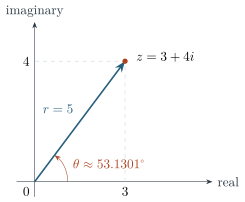
Magnitude \(r\) is nonnegative. Phase \(\theta \) is measured counterclockwise from the positive real axis; a negative phase turns clockwise. The real and imaginary parts are \(r\cos \theta \) and \(r\sin \theta \). Figure 8.1 relates the forms for \(3+4i\).
Press f 5 to change representation. The labels become r and \(\theta \), with deg, rad, or grad beside the phase. A committed value is retained as its rectangular pair; changing representation only changes how it is shown and how the next pair will be entered. It does not move stack registers. Switching representation during entry first accepts that entry in its old representation.
Changing the angle unit while a polar pair is still being entered changes the unit in which its angle will be interpreted. It does not convert the unfinished angle’s digits. Finish a polar entry before changing units when you want to preserve its direction. For committed values, changing units simply expresses the same direction in the new unit. Direct DEG/RAD/GRAD selection and the DRG cycle have the same effect.
To enter a polar number, select the angle unit first. Type the magnitude, press f 4, then type the angle. The key’s legend remains Re/Im, but its two targets are now magnitude and angle. Accepting the pair calculates and stores its rectangular components. Reopening a component in polar form therefore edits a magnitude or phase, after which rectangular components are calculated again. Such an edit can introduce conversion rounding.
Enter a vector by length and direction
Use the chapter’s complex RPN starting state. Clear the stack with f CLEAR. Select DEG with f SIN, and use f 5 if necessary until the display labels are r and \(\theta \). Press:
2 f 4 90 ENTER
The polar display shows r 2.0000 and \(\theta \) 90.0000 deg. Press f 5. The rectangular display shows Re 0.0000 and Im 2.0000: the stored value is \(2i\).
For the reverse direction, with the same RPN settings, DEG and rectangular labels, clear and enter 3 f 4 4 ENTER. Press f 5. The display shows magnitude 5.0000 and phase 53.1301 deg. Press f COS after this completed entry to select RAD: the same value’s phase displays as 0.9273 rad.
Polar display uses the phase returned by \(\operatorname {atan2}\), within one half-turn on either side of zero: \(-180^\circ \) through \(+180^\circ \), or the corresponding radian or gradian limits. Ordinary entry of a negative real value gives the positive half-turn; a retained negative-zero imaginary component can select the negative endpoint. Zero is displayed with magnitude and phase both zero, although its mathematical direction is undefined.
Angles outside this displayed range are accepted and describe the same direction modulo a full turn. A negative entered magnitude is also accepted; after commitment, polar display represents the resulting value with a nonnegative magnitude and an adjusted phase. Prefer a nonnegative magnitude and the intended direction for clear entry.
8.4 Swapping components and changing signs
f 6, the Re\(\leftrightarrow \)Im function, changes \(a+bi\) to \(b+ai\). It exchanges the rectangular components even when polar form is showing. It does not exchange the displayed magnitude and angle. Any active pair entry is accepted first. In RPN, the value remains in X; deeper registers and both Last registers are unchanged. In ALG it replaces the current operand, or starts an edited operand from a completed result; press = to make that edited value the answer.
For example, use the chapter’s rectangular complex RPN starting state. After f CLEAR 2 f 4 3 ENTER, press f 6. The two rows become 3.0000 and 2.0000, representing \(3+2i\). Repeating the swap restores \(2+3i\). This is separate from RPN’s \(x\leftrightarrow y\), which exchanges two complete stack operands.
Sign change also depends on whether entry is active. While editing, +/\(-\) changes the selected component’s sign, or its exponent’s sign when an exponent is being entered. With no entry active, it negates the whole complex number, changing both \(a\) and \(b\). To form the conjugate \(a-bi\) of an accepted rectangular value, reopen its imaginary component and replace it with the negative of its coefficient, then accept the edit. For a simple component such as 3 with no exponent in its editable literal, f 4 +/\(-\) ENTER also changes it to \(-3\) in RPN. In ALG, edit a completed result and finish with =. If a reopened component’s literal contains an exponent, sign change affects that exponent instead; re-enter the desired signed coefficient when necessary. Component selection and swapping are editing controls; they are not general undo operations.
8.5 Arithmetic and supported scientific functions
With COMPLEX showing, ordinary arithmetic uses both components. Addition and subtraction combine corresponding parts; multiplication uses \(i^2=-1\). Division uses a nonzero complex denominator. In RPN the order remains \(Y-X\), \(Y/X\), and \(Y^X\), with the usual stack drop. Unary functions replace X. In ALG the same functions follow the precedence and argument-entry rules in chapter 4.
Both entry modes use the same complex functions. Valid real-axis results retain real-function behavior, including exact trigonometric values at a quadrant in DEG or GRAD. Practical limits appear in section 8.9; section C.4 describes the numerical libraries and rounding conventions.
Function family | Complex behavior |
Arithmetic, sign, reciprocal |
Add, subtract, multiply, divide, negate, and take \(1/z\). |
Square, square root, power, indexed root |
Square uses \(z^2\). Other roots and powers select one principal result; see section 8.8. |
ABS |
Return the real magnitude \(|z|\), with zero imaginary part. It is the orange function of \(\times \). |
Exponentials and logarithms |
\(e^z\), \(10^z\), natural, common, binary, and base logarithms. Logarithms use the branch conventions below. |
Trigonometric and inverse trigonometric |
SIN, COS, TAN and their blue inverses use the selected angle unit for both components of the argument or result. |
Hyperbolic and inverse hyperbolic |
HYP followed by SIN, COS, or TAN, and orange HYP followed by those keys. These use dimensionless complex arguments, independent of DEG/RAD/GRAD. |
Gamma and factorial families |
\(\Gamma (z)\), logarithmic Gamma, \(z!=\Gamma (z+1)\), and logarithmic factorial. |
erf and erfc |
Complex error function and its complement, subject to the nonreal-argument limits in section 8.9. |
%, \(\Delta \%\), T% |
Their algebraic formulas extend to complex operands. RPN still retains Y and all deeper positions. |
Constants and random-number generation supply real values with zero imaginary part. They supply a whole new value, not just the selected component of an open pair. Storage and recall copy complete complex values when CMPLX is on; with it off, they write only the real component. Arithmetic storage follows the same complex setting. See chapter 6 for their operand and stack effects, and chapter 7 for the scientific keys and formulas.
Angles in a complex function
For a complex trig argument \(a+bi\) in DEG, the calculator evaluates the radian function at \((a+bi)\pi /180\). Both components are scaled; the imaginary component is not left in radians. In GRAD the scale is \(\pi /200\). An inverse trig function scales both components of its radian answer back to the selected unit. Choose RAD for the usual mathematical complex-function formulas without an additional scale.
Logarithms and exponentials do not use the angle setting for their rectangular components. In particular, the imaginary part of \(\log z\) is an angle in radians, even with DEG selected. Likewise, \(e^{a+bi}\) uses \(b\) in radians. If the result is then shown in polar form, the phase of that result is displayed in the selected angle unit. Do not confuse it with a rectangular imaginary component that happens to encode an angle.
A complex sine with degree-scaled components
Use the chapter’s rectangular complex RPN starting state. Select DEG with f SIN, then press:
f CLEAR 90 f 4 30 SIN
This calculates \(\sin (\pi /2+i\pi /6)=\cosh (\pi /6)\). The real component displays as 1.1402; the imaginary component is zero. Reducing the real angle by exact quarter turns preserves this axis value before the remaining complex angle is converted to radians. For real-axis trigonometric inputs, the calculator uses the real-function path when it applies.
8.6 Turning complex mode off
Pressing f \(\div \) with COMPLEX present returns to normal real-number calculation. The two-row display closes and only the real component is shown. The imaginary components already stored in stack values, memories, and saved operands remain intact until those values are replaced. Turning complex mode back on reveals the retained components. The rectangular/polar preference is also retained.
Every new value written with complex mode off is real: calculations, stores, recalls, new Last-register captures, and an idle ENTER copy all write an imaginary component of zero. In particular, real-mode RCL does not place a hidden imaginary component in X. It leaves the source memory unchanged, so a later recall with CMPLX on can still retrieve that memory’s complete pair. A real-mode STO replaces the destination with a real value; arithmetic STO computes the new destination from real components.
Lifting, dropping, swapping, or rolling existing stack values moves their retained components together. An idle ENTER moves the original X to Y but creates a real copy in X when CMPLX is off. Turning CMPLX on or reopening the application does not reconstruct a component that a new assignment has replaced with zero.
Keep a complex value while calculating in real mode
Use the chapter’s rectangular complex RPN starting state. This example deliberately replaces ordinary register R0. Enter:
f CLEAR 2 f 4 3 STO 0
Both X and R0 contain \(2+3i\). Press f \(\div \) to turn complex mode off, then RCL 0. Recall puts \(2+0i\) in X, displayed as 2.0000; it leaves R0 unchanged. Press \(1/x\). The result is 0.5000, calculated from the real 2.
Turn complex mode on again with f \(\div \). X now shows \(0.5+0i\). Press RCL 0: the recalled pair is still \(2+3i\), displayed as 2.0000 and 3.0000. The real-mode recall and reciprocal changed working values, not R0. Had you overwritten R0 with CMPLX off, its imaginary component would instead have been replaced by zero.
The real-only interpretation also affects unfinished ALG expressions when they are subsequently evaluated. The complex setting is shared; an expression can contain retained complex operands while real mode is selected. Restore complex mode before evaluating if the intended calculation needs both components.
Associative memory always uses the real component as its key, in both modes. Keys \(3+4i\), \(3-8i\), and 3 select the same entry; storing again replaces that entry. Its value follows the same store/recall rule as ordinary memory: both components with CMPLX on, only the real component with CMPLX off. See section 6.7.
8.7 Functions that use only real components
Complex mode does not extend every operation to a complex domain. The operations below take the real components of their inputs and return real results. A nonzero imaginary input normally produces the status warning Used real portion only. The warning is information about the calculation, not an instruction to reinterpret the displayed answer as complex.
Operations | Interpretation |
INT, FRAC, NINT, floor, ceiling |
Apply the stated integer or fractional rule to \(\operatorname {Re}z\); they do not operate separately on both components. |
MOD and REM |
Compute the respective remainders of the real components of both operands. |
\(nPr\) and \(nCr\) |
Require real components satisfying \(0\leq r\leq n\leq 10\,000\), with both integers. |
atan2 |
Treat the two operands’ real parts as the vertical and horizontal coordinates. It does not take the phase of one pair. |
Unit conversions |
Convert the real component and produce a real result, including when source and destination units are equal. |
Statistics, finance, dates, and RND |
Use real quantities. Stored pairs can remain in their banks until a command replaces them; their imaginary parts do not become statistical or financial inputs. |
These operations are available in both entry modes. ALG statistics and multi-input financial calculations use labeled worksheets; RND acts directly on a completed expression or single entered number. A magnitude is different from a real-part projection: ABS of \(3+4i\) returns 5, while a real-only function starts from 3. Use polar display to inspect a single pair’s phase; the two-operand atan2 function has the different input arrangement described in chapter 7.
For example, use the chapter’s rectangular complex RPN starting state. Press f CLEAR 1.2 +/\(-\) f 4 9 g 6. The blue function of 6 is floor. It returns Re -2.0000, Im 0.0000, and reports that only the real portion was used. It has not floored the imaginary 9 as a second result.
Read the command’s domain before using a stored complex value in a real-only task. The absence of a current warning does not certify a bank’s contents: later entry can clear a previous warning, and ordinary storage/recall is deliberately allowed to retain complete pairs.
8.8 Principal results and branch conventions
Many complex equations have more than one solution. A nonzero number has two square roots, and logarithms differ by integer multiples of \(2\pi i\). The calculator returns one selected result. It does not list all roots or carry a branch-selection setting.
For the principal logarithm, away from its negative-real cut,
On the negative real axis, logarithm explicitly chooses the upper side: \(\operatorname {Log}(-r)=\ln r+i\pi \) for \(r>0\), including an argument whose imaginary component is negative zero. Square root likewise chooses \(\sqrt {-r}=+i\sqrt r\). Away from that cut it returns the square root with nonnegative real part and an imaginary sign following the input’s imaginary sign.
General powers follow \(z^w=\exp (w\operatorname {Log}z)\), evaluated by MPC’s power function. An indexed root uses \(z^{1/w}\), with Y as the radicand and X as the index in RPN. The index must be nonzero and may itself be complex. Consequently, a negative real radicand with an odd integer index gives the principal complex root in complex mode. Real mode instead supplies the real odd root.
A root and a logarithm on the negative real axis
Use the chapter’s rectangular complex RPN starting state. Each row is an independent calculation; first press f CLEAR. The angle setting does not change these rectangular results. LN is the orange function of \(e^x\); indexed root is the orange function of \(y^x\).
Keys after clearing |
Re | Im |
4 +/\(-\) \(\sqrt {x}\) |
0.0000 | 2.0000 |
1 +/\(-\) f LN |
0.0000 | 3.1416 |
8 +/\(-\) ENTER 3 f \(\sqrt [x]{y}\) |
1.0000 | 1.7321 |
The last result is \(1+i\sqrt 3\), one cube root of \(-8\). It is different from the real-mode result \(-2\).
Common and binary logarithms equal \(\operatorname {Log}z/\ln 10\) and \(\operatorname {Log}z/\ln 2\), respectively; MPC evaluates each directly. The two-operand base logarithm calculates
Zero arguments and a base with zero logarithm do not give finite logarithmic results. Familiar real identities involving roots, powers, or logarithms cannot always be rearranged freely across a complex branch cut. For example, \(\sqrt {z^2}\) need not equal \(z\).
Inverse functions and logarithmic Gamma
Inverse trig and inverse hyperbolic functions also select branches. For real arguments where a finite real inverse is available, that real result is retained. Exact values on a branch cut require particular care: matching a function name on another calculator does not guarantee matching imaginary signs there. The table gives representative boundary values; section C.4 supplies the full identities and their numerical interpretation.
| Function and argument | Selected value |
| \(\arcsin (2)\), \(\arcsin (-2)\) | \(\pi /2-iA\), \(-\pi /2+iA\) |
| \(\arccos (2)\), \(\arccos (-2)\) | \(iA\), \(\pi -iA\) |
| \(\operatorname {atanh}(2)\), \(\operatorname {atanh}(-2)\) | \(B-i\pi /2\), \(-B+i\pi /2\) |
| \(\operatorname {acosh}(-2)\) | \(A+i\pi \) |
| \(\arctan (2i)\) | \(\pi /2+iB\) |
| \(\operatorname {asinh}(-2i)\) | \(-A-i\pi /2\) |
To check one of these signs, use the chapter’s rectangular complex RPN starting state. Select RAD with f COS, then press f CLEAR 2 g SIN. Inverse sine returns Re 1.5708 and Im -1.3170. Under DEG, both components of this inverse-trigonometric result would be scaled to degrees; inverse hyperbolic functions remain independent of the angle setting.
For a nonreal argument, logarithmic Gamma is calculated as the principal logarithm of the computed \(\Gamma (z)\). Logarithmic factorial similarly takes the logarithm of \(\Gamma (z+1)\). These are not an unwrapped analytic log-Gamma whose imaginary part can grow beyond the principal-log interval. On real inputs the available real-function path is used where valid; otherwise the complex extension is attempted. Complex mode therefore permits factorials of nonintegers, such as \(\Gamma (3/2)\) for \(0.5!\), but does not remove Gamma’s poles at nonpositive integers or the factorial poles at negative integers. The real-mode factorial limit of 10 000 is not a general restriction on this Gamma extension.
8.9 Numerical limits and interpreting a result
Complex Gamma, factorial, and error functions use approximation or series algorithms. In particular, nonreal ERFC is formed by subtracting erf from 1, so a small tail can lose digits; real ERFC uses the direct calculation described in section 7.11. The numerical methods and their rounding limits are documented in section C.4.
For nonreal inputs, erf and erfc have an approximate magnitude limit of 100 and can report failure to converge. Real arguments use the real error-function path instead. Nonreal Gamma calculations support the exposed working precision range through 10 000 digits and can become expensive as precision increases. These are calculation limits, not limits on the number of places the display can scroll.
Complex mode also leaves genuine singularities: division by zero, logarithm at zero, poles of Gamma, and inverse-function singularities are not made finite by adding a second component row. RPN can display NaN or infinity for a nonfinite arithmetic result; ALG rejects nonfinite values during evaluation. Other operations report a domain or convergence message. A nonfinite current value cannot be reopened with Re/Im; clear or replace it before editing components.
When a result is unexpected, check COMPLEX, rectangular versus polar labels, the selected component, and the angle unit first. Then check whether the function is real-only, whether a principal branch explains the sign, or whether a special-function limit applies. For precision checks, use section 5.8.